SNGPL Bill Payment Online – Payment Methods and Guide
Paying your gas bill on time is important to avoid late payment charges and possible service issues. Fortunately, consumers can use several digital and traditional payment options instead of visiting a bank branch every month. With SNGPL Bill Payment Online, you can pay your monthly gas bill through supported mobile wallets, banking apps, internet banking, and other available payment channels.
Sui Northern Gas Pipelines Limited (SNGPL) provides multiple bill payment options to make the process more convenient for its customers. Depending on your bank or payment service, you may be able to complete the transaction within a few minutes.

Sui Northern Gas Pipelines Limited
+1
This guide explains how to pay your SNGPL gas bill online, which payment methods you can use, what information you need, and how to handle common payment problems.
What Is SNGPL Bill Payment Online?
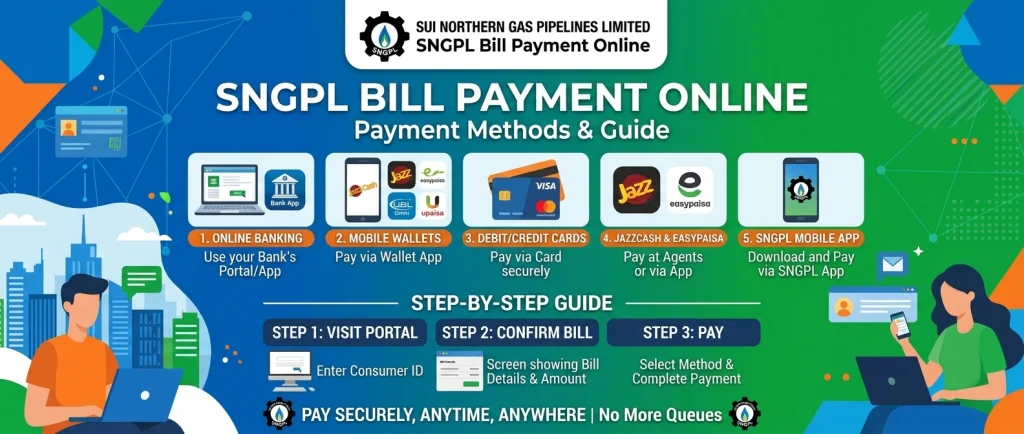
SNGPL Bill Payment Online is a convenient way to pay your monthly gas bill electronically without visiting a physical payment counter. You can use a supported mobile wallet or banking service to retrieve your bill details and complete the transaction.
Online payments can help you save time, avoid queues, and keep a digital record of your transactions. Before making a payment, check your current bill amount, due date, and consumer details to ensure that you are paying the correct account.
What Do You Need to Pay Your SNGPL Bill Online?
Before starting the payment process, keep these details ready:
- Your SNGPL Account ID or consumer number as requested by the payment service.
- Your latest gas bill and payable amount.
- A registered mobile wallet or bank account, if required.
- Sufficient funds to cover the bill.
- Access to your banking PIN or OTP verification when required.
Your Account ID is generally printed in the account information section of your gas bill. Always use the identifier requested by your chosen payment service and verify the displayed customer details before confirming payment.
7 Easy Methods for SNGPL Bill Payment Online
There are several ways to pay your monthly gas bill. The availability of specific options may depend on your bank, app, and account.
1. Pay SNGPL Bill Through Easypaisa
Best for users who prefer mobile wallet payments.
Easypaisa supports utility bill payments, including SNGPL gas bills.
EasyPaisa
+1 Follow these general steps:
- Open the official Easypaisa app and sign in.
- Select Bill Payments.
- Choose the gas bill category.
- Select SNGPL from the available billers.
- Enter your Account ID or the requested consumer number.
- Review the customer details and payable amount.
- Confirm the payment using the app’s instructions.
- Save the transaction receipt or confirmation message.
If SNGPL does not appear in the available billers, check the app for updates or use another supported payment method.
2. Pay SNGPL Bill Through JazzCash
JazzCash offers digital utility bill payments through its mobile app. Gas bill payments are among the supported categories.
Pay Electricity & Utility Bills Online
+1
To pay your bill:
- Open the JazzCash app and log in.
- Tap Bill Payments.
- Select the gas category.
- Choose SNGPL from the available companies.
- Enter the required Account ID or reference details.
- Check the bill information displayed on the screen.
- Confirm the transaction using your MPIN or the requested authentication.
- Keep the payment confirmation for your records.
Check any service charges shown by the app before approving the transaction.
3. Use Your Bank’s Mobile Banking App
Mobile banking is another convenient option for SNGPL Bill Payment Online. Many Pakistani banks offer utility bill payment facilities through their mobile applications. SNGPL also lists mobile banking among its payment channels.
Sui Northern Gas Pipelines Limited
+1
Follow these steps:
- Open your bank’s official mobile banking app.
- Sign in using your registered credentials.
- Navigate to Bill Payments or Utility Payments.
- Select the gas category and choose SNGPL.
- Enter your Account ID or the required bill identifier.
- Verify the customer name and outstanding amount.
- Approve the transaction using the required security method.
- Save the digital receipt.
The exact menu names may vary between banks. If you cannot find SNGPL in the list, contact your bank or check its official bill payment instructions.
4. Pay Through Internet Banking
If you prefer using a computer or laptop, internet banking may allow you to pay your gas bill through your bank’s official website.
Here is the usual process:
- Visit your bank’s official internet banking website.
- Log in to your account securely.
- Open the bill payment section.
- Add or select SNGPL as the biller.
- Enter the required consumer or account details.
- Verify the bill amount and customer information.
- Authorize the payment using the required verification process.
- Download or save the transaction receipt.
Not every bank has the same interface or biller options, so follow your bank’s instructions.
5. Pay Through the Official SNGPL Mobile Application
SNGPL has also provided mobile application facilities for customer billing services. Its payment channels include the SNGPL mobile application.
Sui Northern Gas Pipelines Limited
+1
Before using the app, confirm that you have downloaded the legitimate application from a trusted app store.
Depending on the currently available app features, you may be able to:
- Access your billing information.
- View relevant consumer details.
- Open available payment options.
- Follow instructions to complete a supported payment.
- Review payment-related information.
App features and payment integrations may change over time. Follow the instructions shown in the official application rather than assuming that every payment method is available to every user.
6. Pay Your SNGPL Bill Through an ATM
If you do not want to use a mobile wallet, an ATM may be a suitable alternative. SNGPL lists ATMs among its available payment channels.
Sui Northern Gas Pipelines Limited
+1
The general steps are:
- Visit an ATM operated by a participating bank.
- Insert your card and enter your PIN.
- Open the utility bill payment menu.
- Select the gas category and SNGPL, if available.
- Enter the required account or consumer number.
- Verify the bill details displayed.
- Confirm the transaction.
- Collect the receipt and your bank card.
Menu options vary by bank, and some ATMs may not support every biller. Always check the displayed details before confirming payment.
7. Pay at an Authorized Bank Branch or Payment Location
Online payment is not the only option. Customers who prefer cash or in-person assistance can use an authorized bank branch or another supported collection point.
SNGPL also lists scheduled banks, post offices and NADRA kiosks among its payment locations. Availability can vary by location and service provider.
Sui Northern Gas Pipelines Limited
+1
Take your latest gas bill with you, provide the required account information, and keep the payment receipt. If you are paying close to the due date, confirm the payment deadline and any applicable late payment charges.
How to Check Your SNGPL Bill Before Payment
Checking your bill before paying helps you confirm the amount due and avoid mistakes.
- Visit the official SNGPL website: www.sngpl.com.pk.
- Open the customer services section.
- Find the gas bill or consumer bill service.
- Enter your Account ID or consumer number as requested.
- Submit the required details to view your bill.
- Check the payable amount, due date, and any outstanding charges.
You can save or print the bill for reference before paying through your preferred payment channel. Use the official website for billing information rather than relying solely on third-party websites.
How to Confirm Your SNGPL Bill Payment
After completing your transaction, make sure you have evidence that the payment was successful.
- Check the confirmation message: Review the success notification in your payment app or banking service.
- Save the transaction ID: Keep the reference number, receipt, or screenshot.
- Review your transaction history: Check whether the payment appears in your account activity.
- Verify the bill status: If needed, check the bill information again after allowing time for the payment to be processed.
A successful bank or wallet transaction and an updated gas bill status may not appear at exactly the same time. If the payment has been deducted but the bill still appears unpaid, avoid paying a second time immediately. Contact the payment provider and SNGPL with your transaction details.
Common SNGPL Online Bill Payment Problems and Solutions
Sometimes a payment may fail or the bill details may not appear correctly. The following solutions can help.
Incorrect Account ID
Recheck the Account ID printed on your bill. Even one incorrect digit may prevent the app from retrieving the correct account.
Insufficient Balance
Ensure that your bank account or mobile wallet has enough funds to cover the payment and any applicable charges.
SNGPL Not Listed in the App
Update your payment app or check another supported bank or wallet. You can also contact the service provider for assistance.
Payment Deducted but Bill Still Unpaid
Save your transaction ID and contact your bank or wallet provider first. If the transaction is confirmed but the billing status remains unchanged, contact SNGPL and provide the payment evidence.
Payment Failed or Reversed
Check your transaction history to determine whether the amount was deducted or refunded. Follow your provider’s official complaint procedure if the issue remains unresolved.
Tips for Safe and Timely Gas Bill Payments
Follow these precautions whenever you pay your gas bill online:
- Use official banking and payment applications.
- Confirm that the selected company is SNGPL, not another gas utility.
- Verify the Account ID and payable amount before confirming.
- Never share your banking PIN, password, or OTP with another person.
- Keep transaction receipts until the payment is reflected correctly.
- Pay before the due date to avoid applicable late payment charges.
- Avoid clicking suspicious messages claiming that your gas connection will be disconnected immediately.
These simple precautions can help reduce payment errors and protect your financial information.
Frequently Asked Questions (FAQs)
1. How can I pay my SNGPL bill online?
You can use supported mobile banking apps, internet banking, Easypaisa, JazzCash, the SNGPL mobile application, or other available payment channels.
2. Can I pay my SNGPL bill through Easypaisa?
Yes. Easypaisa supports utility bill payments, including SNGPL. Select the gas bill category, choose the correct company, enter your required account details, and confirm the transaction.
3. Can I pay my SNGPL bill through JazzCash?
Yes. JazzCash offers utility bill payment services. Check the available billers in the app and verify the bill information before completing your payment.
4. Can I pay my SNGPL bill after the due date?
You may be able to make a payment after the due date through a supported payment channel. However, applicable late payment charges may be added. Check your latest bill for the amount payable.
5. What should I do if my payment is deducted but the bill remains unpaid?
Keep your transaction ID and payment receipt. Contact your payment provider to verify the transaction, then contact SNGPL if the bill status does not update.
6. Is online SNGPL bill payment safe?
It can be safe when you use legitimate payment apps, secure banking services, and the official SNGPL website. Always verify the account details and never share your security credentials.
Conclusion
SNGPL Bill Payment Online makes paying your monthly gas bill more convenient by offering several digital and traditional payment options. Whether you choose Easypaisa, JazzCash, mobile banking, internet banking, an ATM, or an authorized payment location, the most important steps are to verify your bill details, confirm the transaction, and keep the payment receipt.
Choose the method that works best for you and try to pay before the due date. If a transaction fails or your bill status does not update, use the official support channels to resolve the issue without making unnecessary duplicate payments.